

Game Boy Advance SP 3.0 Inch M2 IPS LCD Backlight Kit - FunnyPlaying
Game Boy Advance SP 3.0 Inch M2 IPS LCD Backlight Kit - FunnyPlaying
Regular price
$64.99
Regular price
$59.99
Sale price
$64.99
Unit price
per
Shipping calculated at checkout.
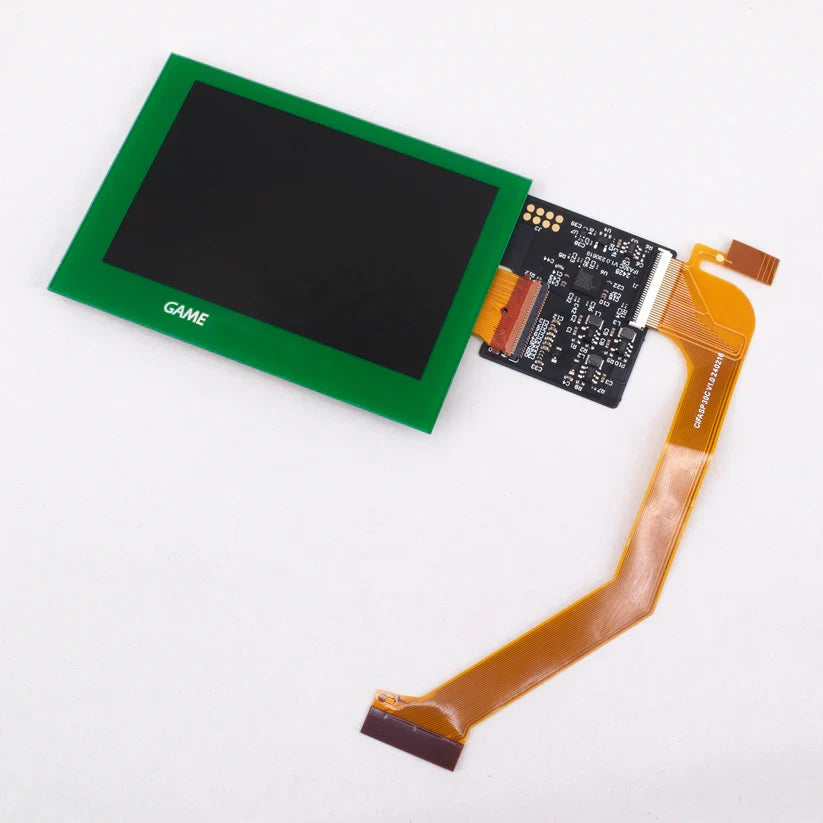
Add this 3.0" Laminated IPS Kit M2 for GBA SP to your Game Boy Advance SP to make your play more enjoyable with a modern display, featuring enhanced brightness, color and clarity!
FEATURES:
- More display effects and Mixed frame switch
- Touch sensor attached to ribbon cable for short press brightness adjustment and long press OSD menu.
-
OSD menu has 8 brightness levels (BRT), 5 color options (CLR) , 3 display options (DSP), frame blending on/off (FRM), and color gamut (CG).
- Fits in original (OEM) shells.
-
Fits with aftermarket and IPS ready shells.
- Foam no longer included and may be necessary for install in some shells. This can be used instead of the bracket for FunnyPlaying Mirror Clear ITA/IPS shells as the bracket is not included with this kit, Purchase foam separately.
- Logo text on glass lens is holographic.
- Soldering optional - only required if you wish to use the traditional brightness button.
INCLUDED:
- 1x 3.0 Laminated IPS M2 LCD with adhered lens (See Warnings)
- 1x PCB
- 1x Ribbon with touch sensor attached
- 1x Wire
PAIRS WELL WITH:
DOCUMENTATION:
- How to test your LCD kit
- Install Guide - *FunnyPlaying did not include the bracket needed to help install this kit into their Mirror Clear ITA/IPS modified shells. If you are using the FunnyPlaying Mirror Clear shell, you can this foam backing instead.
NOTES:
To use the brightness button for OSD menu:
- Long hold (3 to 5 seconds) the brightness button to open the OSD
- Press the button once to change the currently highlighted option
- Long hold the brightness button again to switch highlighted options
- To close the OSD simply don't press the brightness button for 5 seconds
To use the touch sensor for OSD menu and brightness:
- Short press (one to two seconds) adjusts brightness levels without entering OSD menu. Long press (3 to 5 seconds) will open OSD menu.
- Long press again to change menu selection.
- Tap/short press to adjust selection in menu.
- To close the OSD simply don't press/tap the sensor for 5 seconds.
WARNINGS:
- You do not need to purchase a separate lens. Removing pre-adhered lens from LCD can result in damage to the LCD and will void product warranty. If you received an extra lens in your order, this was likely a included plastic lens with a shell and should NOT be placed on top of the pre-adhered lens.
- Test before installation! When you receive a backlight/LCD kit, you should perform a dry run before installing to assure that nothing has been damaged in transit. A dry run or test fit means the kit is not installed in the shell. This includes the use of adhesives, brackets, and any performed soldering. All ribbon cables should have no bends or creases in them. If you are unsure how to perform a dry run, please contact our support team and we will be happy to help. Backlight kits that have been installed are not eligible for replacement or return.
- LCD may break if put under too much pressure or dropped. Please exercise extreme caution when installing.


- Choosing a selection results in a full page refresh.
- Opens in a new window.