


Game Boy Advance 3.0 Inch IPS LCD Backlight Kit M2 with Laminated Lens and OSD - FunnyPlaying
Game Boy Advance 3.0 Inch IPS LCD Backlight Kit M2 with Laminated Lens and OSD - FunnyPlaying
Regular price
$62.99
Regular price
Sale price
$62.99
Unit price
per
Shipping calculated at checkout.
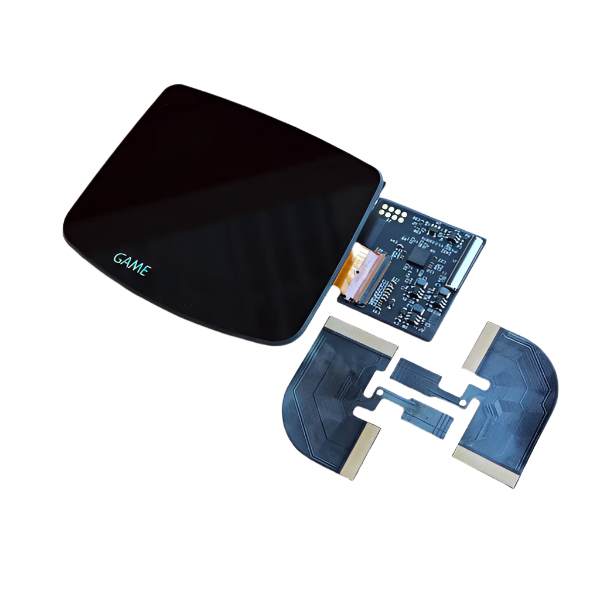
The 3.0 Inch Laminated IPS Kit M2 for Game Boy Advance from FunnyPlaying.
**This kit only pairs with these shells from FunnyPlaying.
FEATURES:
- An IPS and glass lens all in one piece.
- Adjust brightness with touch sensor.
- Long Touch the touch sensor for full OSD menu.
- 15 brightness options (BRT).
- 5 color options - normal, high contrast, retro color, grayscale, and GB green (CLR).
- 3 pixel modes - full pixel, interpolation, and retro CRT (DSP).
- Frame blending mode/flicker reduction (FRM).
- 3 color gamut options - warm, original, and highlight (CG).
- Soldering optional for button controls.
- Applicable console text is present on lens. Holographic text on black and white variants.
INCLUDED:
- 1 x IPS LCD with lens adhered (see warnings)
- 1 x PCB ribbon cable with attached touch sensor
- 3 x Wires
- 1 x Bracket
PAIRS WELL WITH:
- Game Boy Advance IPS/ITA Laminated Shell - FunnyPlaying (ONLY pairs with this shell)
- Game Boy Advance Silicone Membranes - FunnyPlaying
- Game Boy Advance Buttons - FunnnyPlaying
DOCUMENTATION:
- See product photos for install information.
- How to test your LCD kit
NOTES:
- Only pairs with the Replacement Shell for Game Boy Advance - IPS Laminated - Funnyplaying. Other other shells require extensive trimming. Refunds/replacements are not accepted if the incorrect shell is used.
- If you received a bracket that looks different from the one in the product photo, do not proceed with install and please reach out to our support team.
- Long touch the touch sensor to bring up the OSD display menu, from there tapping the touch sensor once will adjust the value, and long holding the touch sensor a second time will allow you to cycle through the OSD. To exit OSD either wait 10 seconds or long hold the touch sensor for about 10 seconds.
- No longer includes foam. Touch sensor (now a larger size) can be adhered to the back of the LCD with Kapton tape/included adhesive when folded in the middle. The touch sensor can also float freely without adhering while being held down by the bracket.
- After installation, if it is noted that your touch sensor is overly sensitive or is cycling, please see this article for assistance.
WARNINGS:
- You do not need to purchase a separate lens. Removing pre-adhered lens from LCD can result in damage to the LCD and will void product warranty. If you received an extra lens in your order, this was likely a included plastic lens with a shell and should NOT be placed on top of the pre-adhered lens.
-
Test before installation! When you receive a backlight/LCD kit, you should perform a dry run before installing to assure that nothing has been damaged in transit. A dry run or test fit means the kit is not installed in the shell. This includes the use of adhesives, brackets, and any performed soldering. All ribbon cables should have no bends or creases in them. If you are unsure how to perform a dry run, please contact our support team and we will be happy to help. Backlight kits that have been installed are not eligible for replacement or return.
- LCD may break if put under too much pressure or dropped. Please exercise extreme caution when installing.


- Choosing a selection results in a full page refresh.
- Opens in a new window.